The default Amazon shopping behaviour is: see a product, read the description, check the star rating, look at the price, decide it seems reasonable, and click Buy. No frame of reference. No historical context. No way of knowing if $279 is a good price or if it was $199 last month and will be $199 again next week. This is exactly how Amazon wants you to shop — and it costs you real money.
Checking Amazon prices before you buy takes 5 seconds with the right tool. It compares the price you are seeing right now to 90 days of real historical data and tells you one thing: is this a good price, or should you wait? That single piece of information — available for free, in 5 seconds — is the difference between buying intelligently and buying blind. This guide covers everything you need to check Amazon prices correctly every time.
The fastest way to check Amazon prices before buying: install Zroppix free, open the product, click the shield icon. Get an instant BUY or WAIT verdict based on 90 days of real price history. BUY means the price is fair or below average — buy now. WAIT means it is above average — set an alert and wait. Free. No account. 5 seconds.
The Uncomfortable Truth About Amazon Prices
This number comes from our research tracking 100 Amazon products over 90 days. At any randomly chosen moment, 54 of those 100 products were selling for more than their own 90-day average price. Not more than a competitor's price. Not more than MSRP. More than what they themselves sold for recently.
Amazon's dynamic pricing algorithm makes approximately 2.5 million price changes per day. The product you are looking at right now may have been $40 cheaper last Tuesday. It may be $50 cheaper two weeks from now. Amazon does not tell you this. Amazon does not want you to know this. The entire business case for withholding price history is that uninformed shoppers consistently pay more.
The solution to all of this is a 5-second price check before every purchase. Not a 10-minute research session. Not comparing across 5 websites. A 5-second check that tells you — based on what the product actually sold for recently — whether the current price is good or above average. That is all the context you need to make a significantly better buying decision.
Four Types of Amazon Price Checks — What You Need and When
Historical price check
Compare the current price to the 90-day average. This is the single most important check before any Amazon purchase. Above average means wait. At or below average means buy. Takes 5 seconds with Zroppix. There is no good reason to skip this on any purchase over $15.
Sale badge verification
When Amazon shows "Limited time deal," "X% off," or a crossed-out reference price — check whether the sale price is actually below the 90-day average or just below an inflated pre-sale reference price. 56% of Amazon sale badges are on products that are at or above their 90-day average.
Competitor price check
For significant purchases, Google Shopping lets you compare Amazon's price against Best Buy, Walmart, Target, and other retailers simultaneously. Worth doing for anything over $100 where a $15-30 difference across retailers is meaningful. Not necessary for every purchase.
Pre-sale inflation check
Before Prime Day and Black Friday, Amazon prices frequently increase 10-20% in the weeks prior — then "discount" back to normal during the sale. Checking price history in the weeks before a sale event reveals whether the "deal" is genuine or manufactured from an artificially elevated reference price.
How to Check an Amazon Price in 5 Seconds — Step by Step
Install Zroppix free — one-time 30-second setup
Go to the Chrome Web Store, search Zroppix, and click Add to Chrome. The installation takes about 30 seconds. No account, no email, no payment required. The gold shield icon appears in your Chrome toolbar immediately. This is a one-time setup — every Amazon visit from this moment on is automatically covered.
💡 Works on Chrome and Brave — the two most popular desktop browsersOpen the Amazon product page you want to check
Navigate to the specific product listing — the individual page with the price, Buy Now button, and product images. The URL should contain /dp/ followed by the ASIN. If you are on a search results page, click the product to open its individual listing. The Zroppix icon works on individual product pages, not search pages.
💡 Works across all Amazon categories — electronics, books, kitchen, clothing, tools, and moreClick the gold shield icon in your Chrome toolbar
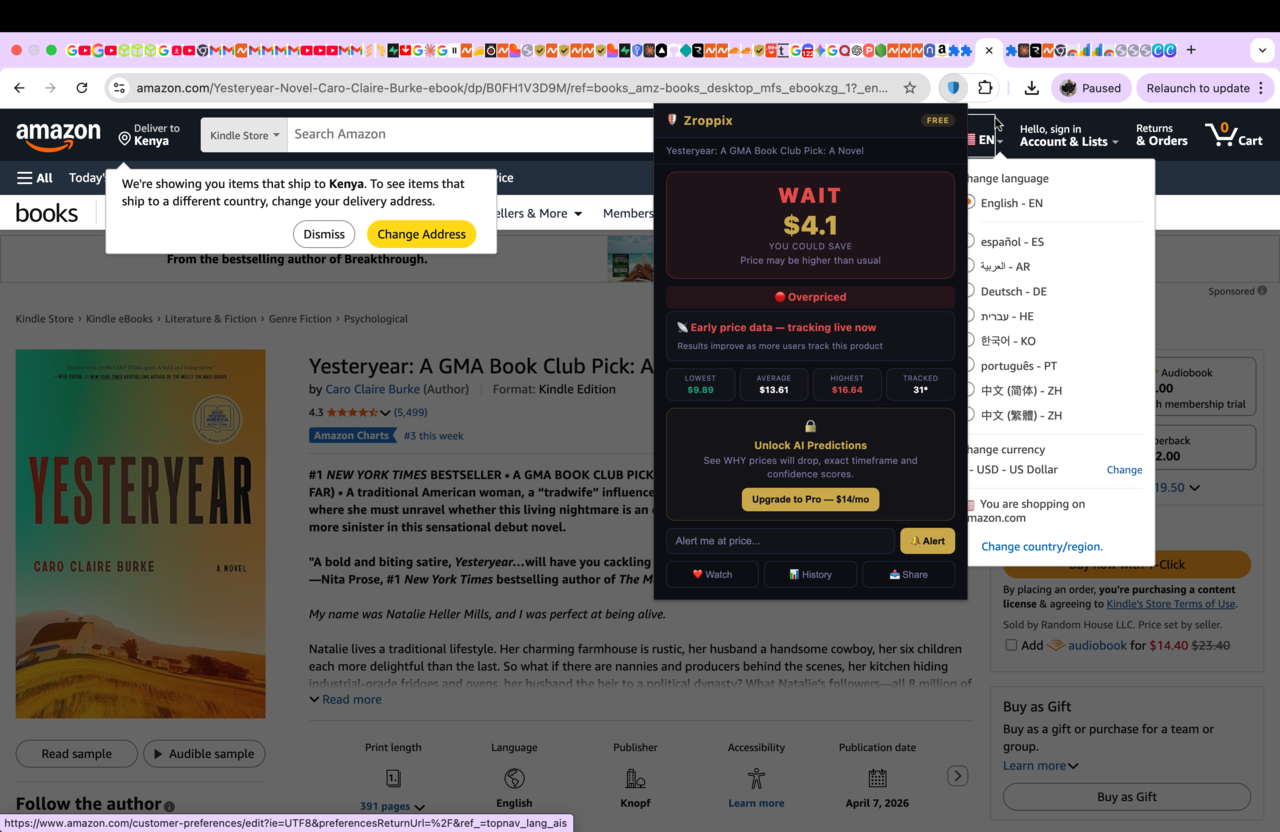
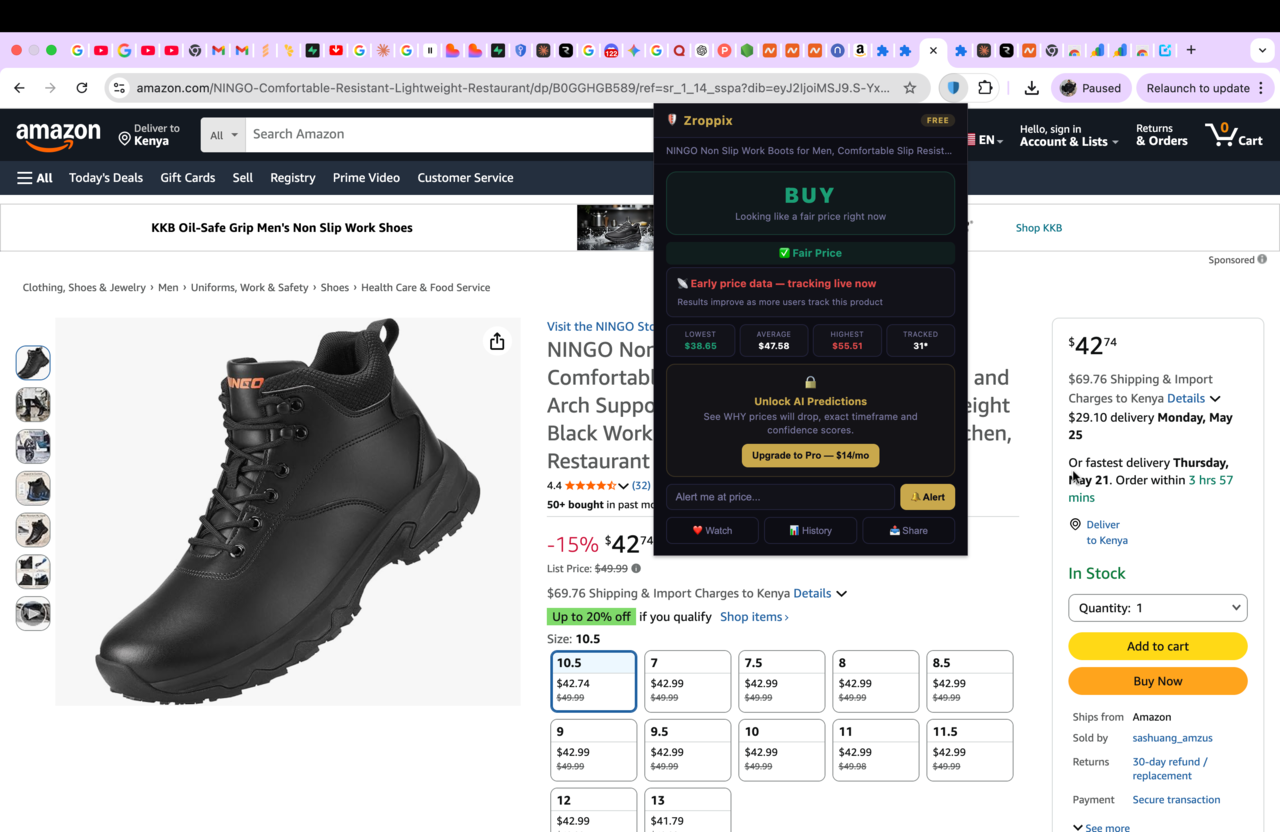
The price check popup opens instantly — no loading screen, no waiting. You immediately see: the BUY or WAIT verdict in large text, the potential savings amount, the overpay risk score from 0-100, what percentage of buyers paid less than the current price, and the 90-day statistics row showing lowest, average, and highest prices.
💡 The entire price check result is visible in one popup — no scrolling, no additional tabsRead the verdict and act on it
BUY verdict: the current price is at or below the 90-day average. This is a historically fair price. Buy now with confidence — this is the answer that means you are not overpaying relative to recent history.
WAIT verdict: the current price is above the 90-day average. You are likely paying more than necessary. Enter your target price (the 90-day average shown in the stats row) and your email in the alert section, click Alert, close the tab, and wait for the email.
💡 Free plan: 3 active price alerts. Pro plan: unlimited alerts at $14/moWhat Zroppix Shows You in the Price Check
When you open a Zroppix price check on an Amazon product, here is exactly what every element means:
- BUY or WAIT verdict — the single most important indicator. BUY means current price ≤ 90-day average. WAIT means current price > 90-day average
- Potential saving amount — in gold, shows how much you could save by waiting when the verdict is WAIT. Based on the difference between current price and recent average
- Overpay risk score (0-100) — shows precisely where the current price sits in the 90-day range. 0-20 = excellent price near recent low. 80-100 = near recent high, strong reason to wait
- What others paid percentage — "73% of buyers paid less than this" means 73% of purchases in the past 90 days were made at lower prices than the current one. High percentage = above-average price
- 90-day statistics row — shows the exact lowest, average, and highest prices over the past 90 days. Use the average as your price alert target
- Price alert section — enter your target price and email to set a watch. Zroppix checks every hour and emails you when the price drops to your target
Check any Amazon price in 5 seconds — free
Zroppix checks the current Amazon price against 90 days of real history and tells you instantly if it is good or overpriced. Free. No account. Works on every Amazon product.
Real Amazon Price Checks — What the Data Actually Shows
Here are real price check results from May 2026 — showing what a price check reveals on five common Amazon products:
Three of five checks show WAIT. That is consistent with our broader research — 54% of products are above average at any given moment. A shopper who buys all five without checking spends $794. A shopper who checks, buys the BUY items immediately, and waits for WAIT items to drop before buying saves $182 on those same five products — more if Prime Day delivers the deeper discounts.
The 4 Amazon Price Deceptions That a Price Check Exposes
The inflated "was" price
Amazon's crossed-out reference price is calculated from the price at which the item was offered — which sellers can inflate artificially before a sale to create the appearance of a larger discount. A product shown at "$89 was $129" may never have actually sold meaningfully at $129.
✓ Counter: check if current price is below 90-day average, not just below the "was" pricePre-sale price inflation
Amazon prices on popular products frequently increase 10-20% in the 4-6 weeks before Prime Day and Black Friday. The sale then "discounts" the product back to what was previously the normal price. Price history reveals the inflation — the sale badge is real but the saving is manufactured.
✓ Counter: compare sale price to 90-day average, not to the inflated pre-sale priceScarcity and urgency signals
"Only 3 left in stock" and countdown timers create artificial urgency that bypasses rational price evaluation. Our research found 68% of Lightning Deal countdown timers end with a product that is not actually cheaper than its normal price. The urgency is manufactured to trigger impulsive buying.
✓ Counter: check the price history first — urgency does not change whether the price is goodPersonalized pricing
Amazon's algorithm can show different prices to different users based on their browsing history, purchase patterns, device type, and location. Repeated visits to a product page signal high purchase intent, which can contribute to maintaining elevated prices specifically for your profile.
✓ Counter: use Zroppix to check the real historical price — set alert, close tab, avoid repeat visitsHow to Check Amazon Prices Without a Chrome Extension
If you prefer not to install an extension, these alternative methods allow you to check Amazon prices without any software installation:
CamelCamelCamel website
Go to camelcamelcamel.com, paste the Amazon product URL, and view the full price history chart. Free, no account needed for basic use. The limitation is time — copying the URL, switching tabs, pasting, loading, and interpreting the chart takes 60-90 seconds per product versus 5 seconds with Zroppix.
Google Shopping
Search the exact product name on Google and click Shopping to see current prices across multiple retailers. Best for checking if Amazon's current price is competitive against Best Buy, Walmart, and Target. Does not show Amazon's own price history — only current competitor prices.
Incognito mode
Open the Amazon product page in an incognito window. Amazon's algorithm cannot read your browsing history in incognito mode, which removes your purchase intent signals as a pricing factor. Prices shown in incognito may differ from your logged-in price. Useful as a quick sanity check — not a substitute for actual price history data.
For any Amazon purchase over $15, checking the price history before buying is worth the 5 seconds it takes. The average saving per checked item — when a WAIT verdict fires and you act on it — is $20-50. A year of consistent price checking saves the documented average of $312. The ROI on 5 seconds per purchase is extraordinary.
How to Check Amazon Prices in Your Cart Before Checkout
The most powerful place to run price checks is immediately before checkout — when you are about to commit to a purchase. Here is the exact process for checking everything in your cart:
- Open your Amazon cart
- For each item in the cart — click the product name to open its individual listing page
- Click the Zroppix icon and check the verdict
- If BUY — the price is fair. Leave it in your cart and proceed
- If WAIT — remove it from your cart temporarily. Set a Zroppix price alert at the 90-day average. Come back and add it to cart when the alert fires
- Buy only the BUY verdict items today
A cart with 5 items takes 25 seconds total to check. If even one item shows WAIT with a $30 potential saving — that 25-second check just saved you $30. The economics of this habit are undeniable.
The single habit that prevents $312 per year in overpayment: check every Amazon price with Zroppix before clicking Buy. Not every other purchase. Every purchase. The check takes 5 seconds. The habit takes 30 seconds to form. The saving is $312 per year — measured, documented, and consistent across Amazon shoppers who adopt it.
Start checking Amazon prices before you buy
Zroppix checks any Amazon price against 90 days of real history and gives you an instant BUY or WAIT verdict. Free Chrome extension. No account needed. 5 seconds per check. Saves the average shopper $312 per year.
✦ 90-day real price history · ✦ Instant BUY or WAIT verdict · ✦ Overpay risk score · ✦ Free price alerts · ✦ Free forever
🛡️ Add to Chrome — It's Free