You found something on Amazon you want to buy. The price feels high. So you think: I will come back when it drops. You bookmark the page, maybe add it to your wishlist. Three weeks later you remember, return to the page, and the price is the same — or higher. You buy anyway, vaguely unsatisfied. This loop costs the average Amazon shopper $312 per year in avoidable overpayment. The solution is not willpower or patience. It is a price watch.
A price watch is a tool that monitors an Amazon product's price on your behalf — every hour, without you doing anything — and sends you an email the instant the price drops to your target. Set it once in 30 seconds, close the tab, and forget the product exists. When the email arrives, you buy at exactly the price you wanted. This guide covers everything: which tools work best, how to set the right target price, what to do when alerts fire, and the common mistakes that mean alerts never fire at all.
The fastest way to watch an Amazon price in 2026: install Zroppix free, open the Amazon product, click the shield icon in your toolbar, enter your target price and email, click Alert. Zroppix checks every hour and emails you instantly when it drops. Free forever. No account needed. Up to 3 products on the free plan — unlimited on Pro ($14/mo).
Why Amazon Has No Built-In Price Watch — The Real Reason
Most people assume Amazon just has not gotten around to building this feature yet. That assumption is wrong. Amazon has the engineering resources to build a price alert feature in an afternoon. They have tested it internally. They have chosen not to offer it publicly, and the reason is economic.
Amazon's dynamic pricing system makes approximately 2.5 million price changes per day. When prices drop — for hours, for a day, for a week — a large portion of shoppers never notice. They return when they remembered to check, find the price already recovered, and buy at the higher price. If Amazon sent email alerts every time a price dropped, shoppers would consistently wait for drops instead of buying at inflated prices. The lost revenue from patient, informed shoppers would be significant.
Amazon's wishlist does send occasional price drop emails — but this feature is deliberately limited. It only triggers for large price drops, misses most changes, and gives you zero control over your target price. It is not a price watch system. It is a checkbox that lets Amazon say they tried.
Third-party price watching tools exist specifically to give you the transparency Amazon chose to withhold. They monitor Amazon's public pricing independently — Amazon cannot suppress them — and they act as your automated shopping assistant. Understanding this context helps: when you use Zroppix or CamelCamelCamel, you are not using a workaround. You are using the feature Amazon deliberately decided not to build for you.
The Numbers Behind Why Price Watching Matters
Our research tracking 100 Amazon products over 90 days found that at any given moment, 54% are priced above their own historical average. That means on a typical Amazon shopping session, more than half the items you look at are overpriced relative to what they were selling for recently — and what they will sell for again soon. Price watching is not about being obsessive. It is about not being the person who pays the inflated price that the other 73% of buyers avoided.
Every Amazon Price Watch Method — Ranked Honestly
Zroppix — BUY/WAIT Verdict + Hourly Monitoring
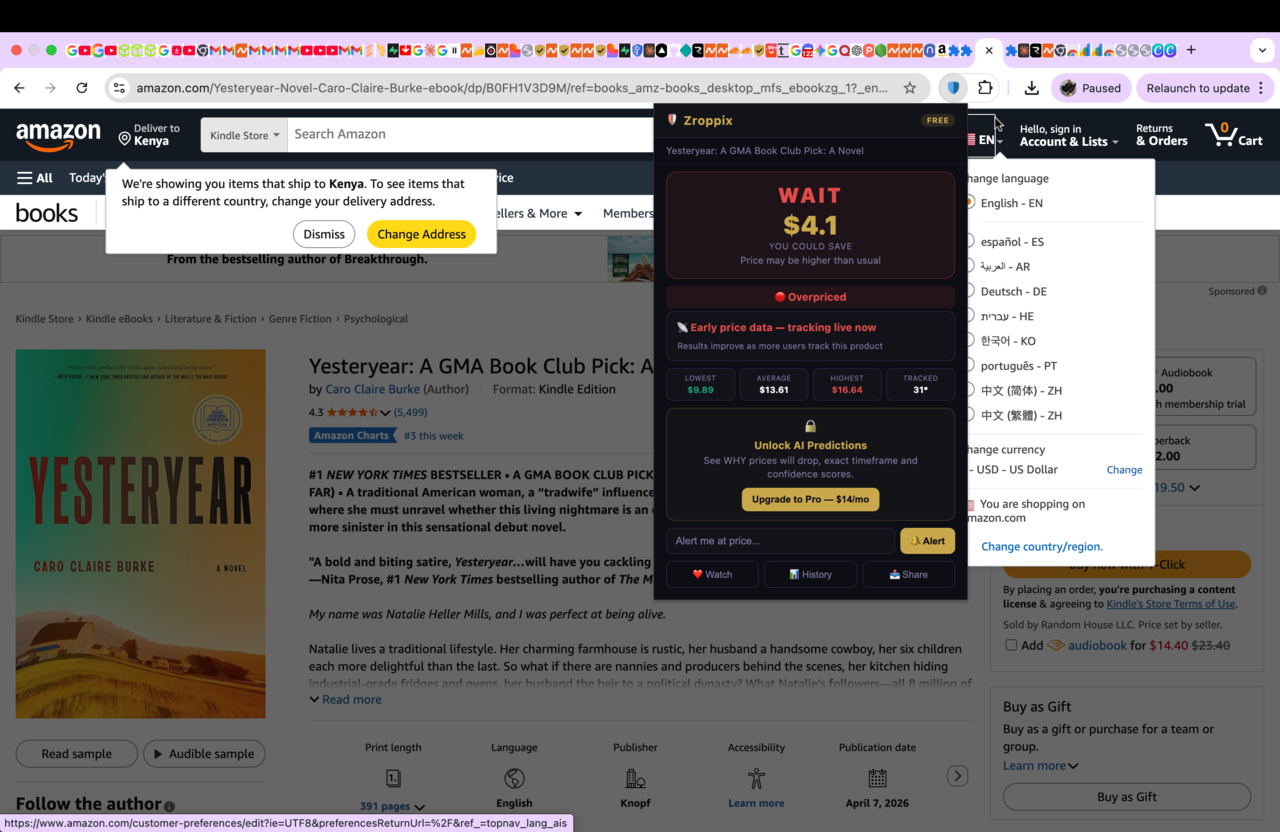
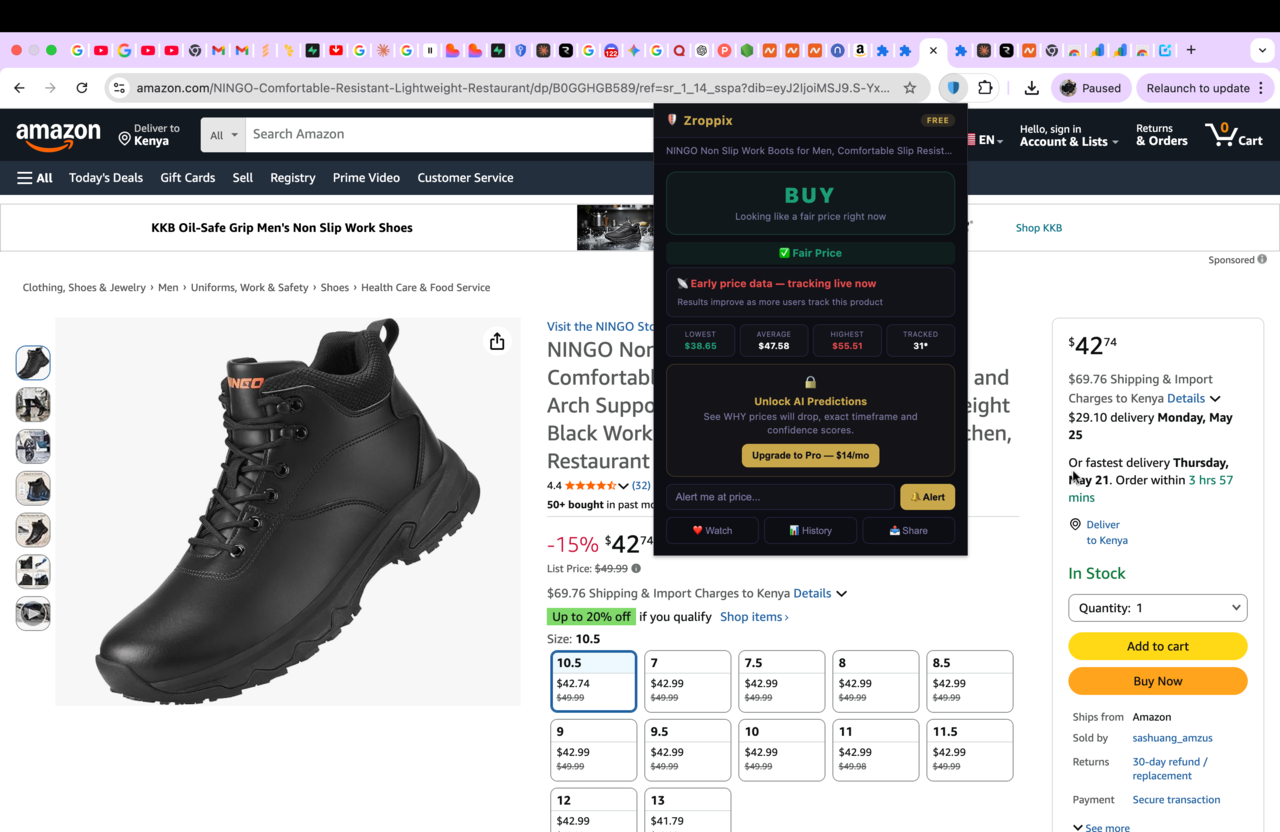
The most complete system for regular shoppers. Before setting any alert, Zroppix tells you whether the current price is already good — so you do not set a watch when you should just buy now. If the verdict is WAIT, enter your target price and email. Zroppix checks every hour and emails you the instant the price drops. The verdict, overpay risk score, 90-day history, what others paid, and the alert tool are all in one popup — no separate tabs, no chart interpretation, no account required for basic use.
✅ Best Overall — Recommended for All ShoppersCamelCamelCamel — Free Unlimited Watches Since 2008
The original Amazon price tracker. Completely free, no paid tier, unlimited watches with a free account. Create an account, paste the Amazon URL, set your target price. CamelCamelCamel emails you when the price drops. The main limitations: you must leave Amazon to set up watches, the interface is outdated, there is no verdict or overpay score, and price checks happen less frequently than Zroppix. Best for situations where you need more than 3 watches and do not want to upgrade to Pro, or where you want multi-year price history data.
Good — Best Free Unlimited OptionKeepa — Professional Grade Price Tracking
Built for Amazon FBA sellers, resellers, and power users. Price watch alerts require a paid subscription. The advantage over free tools is the depth of data alongside alerts — years of price history, sales rank, Buy Box analysis, and international marketplace tracking. For casual shoppers, Keepa's complexity adds friction without clarity. For professional sellers who need comprehensive market intelligence alongside alerts, it is the industry standard.
Good — For Sellers and Power Users OnlyAmazon Wishlist — Deliberately Limited
Amazon's wishlist sends occasional price drop emails but gives you no control over your target price, only triggers on significant drops, and misses most price changes. This is not a reliable price watch system. Mentioned only because it is the first thing most people try. It will disappoint you. Use any third-party tool instead.
⚠️ Unreliable — Not RecommendedManual Checking — The Worst Possible Method
Returning to the product page manually every few days. This method has three critical failures: you miss time-sensitive drops that happen and recover within hours; you often forget to check and buy eventually at the same high price; and repeated visits to the page send Amazon's algorithm strong purchase intent signals, which can cause prices to stay elevated specifically for your browsing profile. Free automated tools exist. Manual checking is never the right answer.
❌ Never Do ThisHow to Set Up an Amazon Price Watch in 5 Steps
This is the complete Zroppix setup — from install to active watch — taking roughly 60 seconds total:
Install Zroppix free from the Chrome Web Store
Search "Zroppix" in the Chrome Web Store or click "Add to Chrome" on zroppix.com. The installation takes about 30 seconds and requires no account, no email, and no payment. The gold shield icon appears immediately in your Chrome toolbar. It works on Amazon from the moment it is installed.
💡 One-time setup — works on every Amazon visit forever after, automaticallyNavigate to the specific Amazon product page
Open the individual product listing — the page with the price, Buy Now button, and product images. Not a search results page. The URL should contain /dp/ followed by the product's ASIN code (e.g. amazon.com/dp/B09JQMJHXY). If you are on a search page, click the product image or title to open its individual listing.
💡 Works on Amazon.com, Amazon.co.uk, Amazon.ca, Amazon.de, and moreClick the Zroppix shield icon — read the verdict before anything else
The popup opens instantly showing the BUY or WAIT verdict, 90-day price statistics, overpay risk score, what percentage of buyers paid less, and the alert input at the bottom. Read the verdict first. If it says BUY — the current price is already at or below the 90-day average. Buy now. You do not need a watch. If it says WAIT — proceed to step 4.
💡 This step alone saves money — many shoppers discover the price is already goodSet your target price using the 90-day data shown
Look at the stats row in the Zroppix popup: it shows the 90-day lowest, average, and highest price. Set your target price in the alert input field. In most cases, the 90-day average is the right target — it is realistic, achievable, and represents a genuinely fair price the product has demonstrably sold at recently. See the full target price guide in the next section for product-specific recommendations.
💡 Set target at 90-day average, not all-time low — that price may never returnEnter your email, click Alert, then close the Amazon tab permanently
Type your email address. Click the Alert button. Your watch is now active. Zroppix checks the price every hour from this moment on. Then — and this is important — close the Amazon tab completely. Do not return to check manually. Repeated visits signal to Amazon's algorithm that you are highly interested in buying, which can keep prices elevated for your profile. The watch runs silently in the background. When the price drops, you get an email within one hour.
💡 Close the tab. Trust the system. Act within 2 hours when the email arrives.Zroppix vs CamelCamelCamel vs Keepa — Full Comparison
| Feature | 🛡️ Zroppix | 🐪 CamelCamelCamel | 📊 Keepa |
|---|---|---|---|
| BUY or WAIT verdict | ✓ | ✗ | ✗ |
| Works on Amazon page directly | ✓ Extension | Website only | ✓ Extension |
| Price check frequency | Every 1 hour | Every few hours | Very frequent |
| No account needed | ✓ Basic use | ✗ Account needed | ✗ Account needed |
| Free price alerts | ✓ 3 watches | ✓ Unlimited | Paid only |
| Overpay risk score | ✓ | ✗ | ✗ |
| What others paid | ✓ | ✗ | ✗ |
| 90-day price history | ✓ | ✓ | ✓ |
| Multi-year price history | ✗ | ✓ | ✓ |
| AI price predictions | Pro plan | ✗ | ✗ |
| Sales rank tracking | ✗ | ✗ | ✓ |
| Built for regular shoppers | ✓ Primary focus | Partially | ✗ Built for sellers |
| Price to get started | Free | Free | Free basic / paid full |
The Science of Setting the Perfect Target Price
The target price you set is the single most important decision in your entire price watch setup. Too high and it fires when you could have bought already — no benefit. Too low and it never fires — you wait indefinitely for a price that never comes. The right target sits in a specific, calculable range based on price history data.
The 90-Day Average Rule — Your Default Target
For any product where you have no specific sale event in mind, set your target at the 90-day average price shown in Zroppix. This is a price the product has demonstrably sold at within the past 3 months. It is realistic. It represents genuine fair value rather than a historical anomaly. Products priced above their 90-day average return to that average within 30-60 days in the vast majority of cases. Setting your target there virtually guarantees the alert fires within 2 months.
The Sale Event Adjustment
If Prime Day or Black Friday is approaching — which as of May 2026 means Prime Day is 4-6 weeks away — adjust your targets downward. Set targets 20-30% below current price for Amazon devices and major electronics. These products have reliably hit those discounts during every Prime Day and Black Friday for the past 5+ years. The 90-day average will not capture Prime Day pricing — you need to set lower for sale events.
Product-Specific Target Guide
What Zroppix Shows You Before You Set Your Watch
The critical differentiator between Zroppix and every other price watch tool is the BUY or WAIT verdict displayed before you set any alert. Other tools simply let you input a target price — they do not tell you whether the current price is good. That means buyers set watches on products that are already at fair prices, then wait unnecessarily for alerts that fire at lower prices they did not actually need.
Start watching any Amazon price right now — free
Zroppix is the only price watch tool that tells you whether to buy now or wait before you set any alert. Free Chrome extension. No account needed. Hourly monitoring. Email the instant the price drops to your target.
The 4 Price Watch Mistakes That Guarantee You Never Save Money
Setting the all-time low as your target
The product's lowest ever price happened during a one-time clearance event, discontinued inventory sale, or promotional launch. It may have been 3 years ago and will never recur. Setting your target there means waiting indefinitely. Use the 90-day low — a price the product reached recently and will likely reach again.
✓ Fix: Target the 90-day average, not the all-time lowContinuing to visit the page after setting the watch
Every time you return to an Amazon product page, Amazon's algorithm logs it as purchase intent. High-frequency visits to a specific product can cause the algorithm to maintain elevated prices specifically for your browsing profile and Amazon account. Set the watch, close the tab, and stay away.
✓ Fix: Set alert → close tab → wait for email, no manual checksSkipping the BUY/WAIT verdict check
Setting a price watch when the verdict is BUY means you are waiting unnecessarily for a price that is already fair. The entire point of the verdict is to tell you if you should buy now or wait. Skipping it means you might wait 3 weeks for a product you could have bought today at a good price.
✓ Fix: Always check verdict before deciding whether to set a watchNot acting quickly when the alert fires
Amazon price drops from flash sales, Lightning Deals, and temporary inventory clearances can last hours before recovering. Shoppers who see the alert, think "I'll buy it tonight," and come back 8 hours later find the price already recovered. When Zroppix emails you — act within 2-3 hours.
✓ Fix: Enable email notifications, act within 2 hours of receiving alertAmazon Price Watch Strategy for Prime Day 2026
Prime Day 2026 is approximately 4-6 weeks away from the date of this guide. This is the most important price watch window of the year. Here is the exact strategy:
Start setting watches now
Anything you are considering buying before the end of the summer — add to Zroppix watches this week. Set targets 20-30% below current prices for electronics, Amazon devices, and appliances. This gives the watch time to fire at Prime Day pricing when the deals launch in June. Watches set the day before Prime Day are less useful — you want the monitoring running before the event so you catch the deal within the first hour it drops.
Know which categories reliably discount at Prime Day
Amazon devices (Echo, Kindle, Fire TV, Ring): 30-50% discounts every year without exception. AirPods and Apple Watch: 20-30% consistently. Robot vacuums (iRobot, Roborock): 25-40%. Instant Pot and Ninja kitchen appliances: 15-25%. Gaming peripherals: 20-35%. Laptop accessories: 15-25%. These are the highest probability categories for Prime Day alerts firing at your target.
Set layered alerts at different price points
For a $249 product — set one alert at $229, one at $199, one at $169. Whichever price it hits first, you get notified. If it only reaches $229 — decide in real time if that is enough discount for you. If it hits $169 — you buy at the best possible price. Layered alerts remove the regret of having set a target that was just slightly too low to trigger.
Be ready on Day 1 at opening
The best Prime Day deals on popular items sell out within hours on Day 1. Keep your email notifications active and check your inbox from the moment Prime Day begins. When an alert fires during Prime Day — open it immediately and buy. Do not save it for later.
Prime Day 2026 is your biggest price watch payoff opportunity of the year. Spending 10 minutes setting watches on everything you plan to buy in the next 3-6 months — right now, today — could save you $200-500 if you are buying electronics, appliances, or Amazon devices at Prime Day pricing.
What Happens When Your Price Watch Alert Fires
When Zroppix detects the price has dropped to your target, an email goes out to you within one hour of the drop occurring. Here is what the email contains and exactly what you should do when it arrives:
The alert email contains
- The product name and image
- The price it dropped to — your target or below
- The price before the drop — so you can see the saving
- A direct link to the Amazon product page
- The time the drop was detected
Your action plan — in order
- Click the link in the email immediately — do not search for the product separately, you might land on a different variant or an outdated page
- Verify the price still shows your target on the Amazon page — confirm before adding to cart
- Check the seller — ensure the discounted price is from Amazon directly or a well-reviewed seller, not an unknown third party with a suspiciously low price
- Add to cart and checkout within 2 hours — especially for Lightning Deals, flash sales, and highly popular products where stock is limited
- If the price already recovered — the watch stays active. Zroppix continues monitoring. The price will drop again.
One sentence that summarises the perfect price watch strategy: set the target at the 90-day average, close the tab, forget the product until the email arrives, then act within 2 hours. Every step matters. The system delivers — if you follow it.
How Many Amazon Products Can You Watch at Once?
Zroppix free plan: 3 active price watches simultaneously. This is the right amount for most shoppers who are targeting 1-3 specific purchases at any given time — a laptop, headphones, and maybe an appliance.
Zroppix Pro ($14/month): unlimited price watches. Worth upgrading if you are a frequent Amazon shopper wanting to watch 5+ products at once, shopping for a household renovation, or consistently buying electronics and appliances. The first significant price drop the Pro plan catches typically covers the monthly subscription cost.
CamelCamelCamel: unlimited free watches with a free account. The better free option if you need more than 3 watches and do not want to pay. Limitation: less frequent checks, no verdict, requires leaving Amazon to manage.
Watch any Amazon price — get emailed the instant it drops
Zroppix is the only price watch tool that tells you whether to buy now or wait before you set any alert. Checks every hour. Emails instantly when the price hits your target. Free Chrome extension. No account. No credit card.
✦ BUY or WAIT verdict first · ✦ Hourly price monitoring · ✦ Instant email alerts · ✦ Free forever
🛡️ Add to Chrome — It's Free