You have been here before. You buy something on Amazon — maybe a pair of headphones, a kitchen appliance, a piece of tech you needed. You feel okay about the price. Then two weeks later a friend mentions they got the same thing for $40 less. Or worse — you check the price yourself and it has dropped. The frustration is not just about the money. It is about the feeling that the system is rigged against you. Because it is.
Amazon's dynamic pricing algorithm makes 2.5 million price changes per day. It tracks your browsing behavior, your purchase history, your device, your location, and how many times you have visited a specific product page — and uses all of it to determine the highest price you are likely to pay. Without a counter-system, you are at a permanent information disadvantage. This guide eliminates that disadvantage entirely.
Before buying anything on Amazon over $15 — check the 90-day price history with Zroppix. If the price is at or below average, buy now. If it is above average, set a price alert and wait for the email. That is the entire system. It saves the average shopper $312 per year with 5 seconds of effort per purchase.
Why You Are Overpaying — The Real Reason
The core problem is an information gap. Amazon has complete data on every price change, every demand fluctuation, and every pricing opportunity. You see one number — the price right now — with no context for whether that number is high, low, or average relative to what the product normally sells for.
Our research tracking 100 Amazon products over 90 days found that at any randomly chosen moment, 54% of products are priced above their own 90-day historical average. That means on a typical Amazon shopping session, more than half the products you look at are overpriced relative to what they sold for recently and what they will sell for again soon.
Amazon does not show you price history. This is not an oversight — it is a deliberate design decision. Showing you that the product was $40 cheaper last Tuesday would directly reduce revenue. The absence of price history on Amazon's interface is the information gap that costs you $312 per year.
56% of Amazon "Limited time deal" and "X% off" sale badges appear on products that are at or above their 90-day historical average price. The discount is calculated from an artificially inflated reference price. The badge is real. The saving is often manufactured. Never trust a sale badge without checking the price history.
The Complete System — 5 Steps
Install Zroppix free — one-time 30-second setup
Go to the Chrome Web Store and search Zroppix. Click Add to Chrome. No account, no email, no payment required. The gold shield icon appears in your toolbar immediately. This is the only setup step — every Amazon visit from this moment on is automatically covered. You never need to do anything else to activate the system.
💡 Works on Amazon.com, .co.uk, .ca, .de, and other major marketplacesCheck every purchase before adding to cart
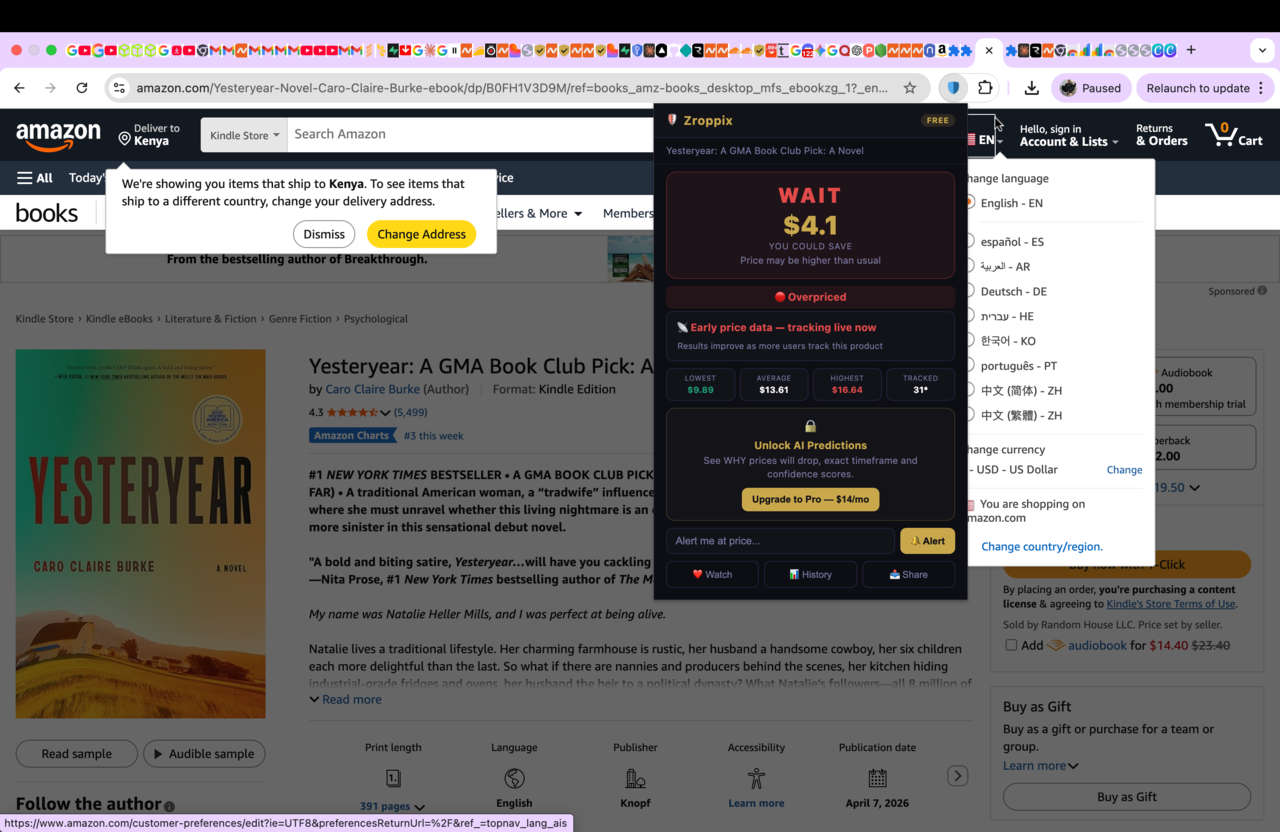
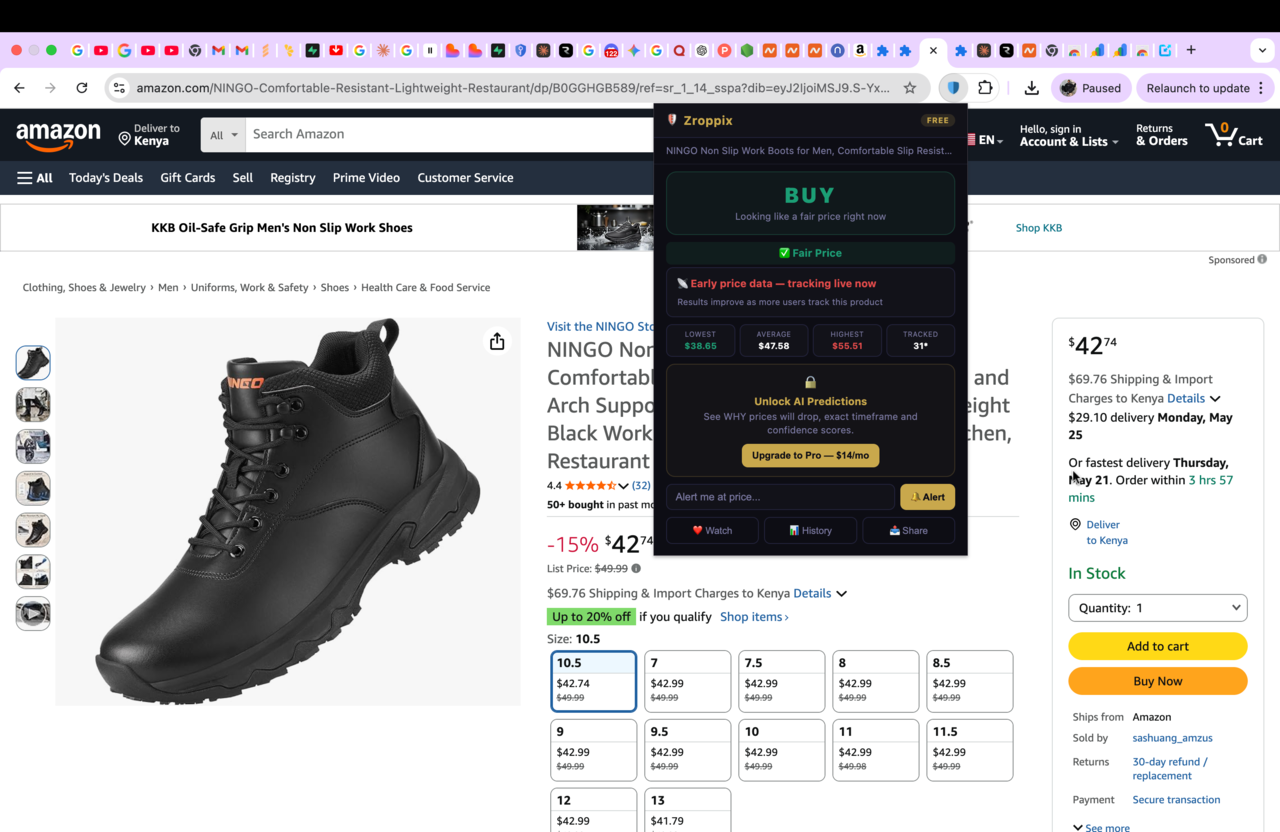
Before clicking Add to Cart on anything over $15 — open the product page and click the Zroppix shield icon. The price check takes 5 seconds. You see the 90-day lowest, average, and highest price, the BUY or WAIT verdict, the overpay risk score, and what percentage of previous buyers paid less than the current price. This 5-second check is the entire habit that makes the system work.
💡 Do this on every purchase — including ones with sale badges and countdown timersIf BUY — buy immediately with confidence
A BUY verdict means the current price is at or below the 90-day average. This is a historically fair price — you are not overpaying relative to what others paid recently. Buy now. Do not second-guess the verdict. Do not wait to see if it goes lower. A BUY verdict is the outcome the system is designed to deliver — it means you are buying at the right time.
💡 BUY = buy now. Trust the data. Do not delay.If WAIT — set a price alert and close the tab
A WAIT verdict means the current price is above the 90-day average. Enter your target price — the 90-day average shown in the stats — and your email address in the alert section. Click Alert. Then close the Amazon tab completely. Do not return to check manually. Zroppix monitors the price every hour. When the price drops to your target, you get an email within one hour. Closing the tab is important — repeated visits to a product page send purchase intent signals to Amazon's algorithm that can keep prices elevated for your profile.
💡 Set target at 90-day average. Close the tab. Wait for the email. Act within 2 hours.When the alert fires — act immediately
When Zroppix emails you — open it immediately. Click the link to the Amazon product page. Verify the price still shows your target. Add to cart and complete checkout within 2-3 hours. Amazon price drops from flash sales and Lightning Deals can recover within hours. When the alert fires — it is the signal you have been waiting for. Buy without hesitation if the price is confirmed.
💡 Enable email push notifications so you see the alert within minutesWhat the System Saves You — Real Numbers by Category
| Purchase Category | Typical Annual Purchases | Avg Saving Per Purchase | Annual Saving |
|---|---|---|---|
| Electronics (headphones, accessories, tech) | 3-4 purchases | $25-45 | $75-180 |
| Kitchen and home appliances | 4-6 purchases | $15-30 | $60-180 |
| Health, beauty, and personal care | 8-12 purchases | $5-12 | $40-144 |
| Books and media | 10-15 purchases | $3-8 | $30-120 |
| Clothing and fashion | 5-8 purchases | $8-20 | $40-160 |
| Tools and home improvement | 3-5 purchases | $12-25 | $36-125 |
| Total Annual Saving | 33-50 purchases | $10-28 avg | $281-909/year |
These numbers represent the saving from consistently buying at or below the 90-day average rather than at random. The system does not require patience beyond what is reasonable — most price alerts fire within 2-6 weeks. For products you need urgently, the system still adds value: a BUY verdict tells you the current price is already fair and you can buy immediately without regret.
Real Case Studies — The System Working
Start the system right now — 30 seconds
Install Zroppix free. Check the next Amazon product you were about to buy. See instantly whether you are about to overpay or buy at a fair price. Free forever. No account.
The 5 Rules That Make the System Actually Work
Check every purchase over $15 — no exceptions
The habit only works if it is consistent. Skipping the check on purchases you think are "obviously good deals" is where most people lose money. Sale badges, countdown timers, and crossed-out reference prices are specifically designed to make you feel the check is unnecessary. They are most effective precisely when the price is most inflated. Check everything over $15. No exceptions.
Trust the verdict — do not rationalize WAIT into BUY
When Zroppix says WAIT — wait. The most common failure of this system is overriding a WAIT verdict because you want the item now, because it is a gift and you have a deadline, or because you convinced yourself the price will not drop. The verdict is based on 90 days of real data. Your rationalization is not. Trust the data.
Set the alert target at the 90-day average — not the all-time low
The 90-day average is a price the product has demonstrably sold at recently. It is achievable within a reasonable waiting period. The all-time low may have been a one-off clearance event from years ago that will never recur. Setting your target at the all-time low means waiting indefinitely for a price that may never come. Use the 90-day average as your target.
Close the Amazon tab after setting an alert
Every time you return to a product page after setting an alert, you send Amazon's algorithm a purchase intent signal. High-frequency visits can cause Amazon to maintain or raise prices for your profile specifically. Set the alert, close the tab, and stay away from the page until the email arrives. The monitoring happens server-side without your browser involved.
Act within 2 hours when the alert fires
Amazon price drops from flash sales and Lightning Deals can last hours before recovering. Saving the alert email for later is the single most common way to miss the price you waited for. When the email arrives — open it immediately, verify the price, and complete the purchase. Enable push notifications on your email app so the alert is visible within minutes of arrival.
The 5 Mistakes That Break the System
Skipping the check because there is a sale badge
Sale badges are calculated from reference prices that sellers set. 56% of sale badges appear on products above their 90-day average. The badge is the exact moment to check — not the moment to skip the check.
✓ Fix: Check before buying regardless of badgeSetting the all-time low as your target
The product's lowest ever price was often a one-off event. Setting your alert target there means waiting indefinitely. Use the 90-day average as your target — it is achievable and realistic.
✓ Fix: Target 90-day average, not all-time lowManually checking the price after setting an alert
Each manual visit to the product page after setting an alert signals purchase intent to Amazon's algorithm, potentially keeping the price elevated for your profile. Set and forget — Zroppix monitors hourly.
✓ Fix: Set alert, close tab, wait for email onlyNot acting when the alert fires
Price drops on Amazon can recover within hours. Saving the alert email for later and finding the price recovered is the most frustrating failure mode of the system. Act within 2 hours every time.
✓ Fix: Enable email push notifications, act within 2 hoursApplying the System to Prime Day 2026
Prime Day 2026 is approximately 6 weeks away. The system works differently for sale events — here is how to apply it:
Before Prime Day — set alerts now
For anything you plan to buy at Prime Day — set a Zroppix price alert now at your Prime Day target price. For Amazon devices (Echo, Kindle, Fire TV) — set the target at 30-40% below current list price. For AirPods and Apple Watch — set 20-25% below. For kitchen appliances — set 15-20% below. When Prime Day arrives, your alerts fire automatically if the price hits your target. You do not need to monitor Prime Day manually.
During Prime Day — verify every deal before buying
When you see a Prime Day deal badge — check Zroppix before adding to cart. Our research found that only 27% of Prime Day deals are genuine discounts below the product's normal price. The other 73% are calculated from inflated pre-sale reference prices. Zroppix confirms in 5 seconds whether the Prime Day price is actually below the 90-day average — or whether it is a manufactured deal from an inflated baseline.
One sentence that covers the entire system: before every Amazon purchase over $15 — check Zroppix, buy if the verdict is BUY, set an alert and close the tab if it is WAIT, act within 2 hours when the email arrives. Five seconds of habit. $312 per year of savings. No exceptions. No shortcuts. Just the system.
Never overpay on Amazon again — start in 30 seconds
Zroppix checks 90 days of real Amazon price history and gives you an instant BUY or WAIT verdict on every product. Free Chrome extension. No account needed. 5 seconds per check. $312 average annual saving.
✦ 90-day real price history · ✦ BUY or WAIT verdict · ✦ Hourly price monitoring · ✦ Free price alerts · ✦ Free forever
🛡️ Add to Chrome — It's Free