The worst Amazon shopping habit is returning to the same product page every few days to check if the price dropped. It wastes time you do not have. You forget to check for two weeks and then buy at the same high price out of frustration. And — this part most shoppers do not know — Amazon's algorithm tracks every visit to a product page as a purchase intent signal. Repeated visits to the same product can actually cause the price to stay elevated specifically for your browsing profile. Manual price checking is counterproductive in more ways than one.
A price watch solves all of this. Set it once in 30 seconds. Amazon prices get checked every hour on your behalf. When the price drops to your target — you get an email within one hour. You open the email, click the link, and buy at exactly the price you wanted. Zero ongoing effort. No forgotten checks. No intent-based price inflation from repeated visits. This guide covers the complete system — every tool, every detail, every mistake to avoid.
The fastest way to set a price watch on Amazon: install Zroppix free, open the product, click the shield icon, enter your target price (use the 90-day average shown) and email, click Alert. Zroppix checks every hour and emails you the instant the price drops. Free. No account. 30-second setup. Up to 3 watches on free plan — unlimited on Pro.
How Amazon Price Watching Actually Works
You set a target price
Tell Zroppix what price you want to pay — set at the 90-day average shown in the popup. Enter your email address for the alert. Click Alert. Done in 30 seconds.
Zroppix monitors hourly
Zroppix checks the Amazon price every hour automatically. You close the tab and forget the product exists. No manual checking. No browser tabs. No remembering.
Email arrives — you buy
The moment the price drops to your target, an email arrives within one hour. Click the link. Verify the price. Buy. You saved $20-70 by waiting instead of guessing.
The mechanics are simple. The results are not. This system — set once, run automatically, act when notified — consistently delivers savings that manual checking cannot. The average saving per price watch that fires is $20-70 depending on the product category. The setup cost is 30 seconds per product watch.
Why Amazon Has No Built-In Price Watch — And Why It Matters
Amazon is one of the most technically sophisticated companies on earth. Building a price drop notification feature would require approximately 2 hours of engineering work. They have evaluated it, tested it, and deliberately chosen not to offer it. The reason is financial: price watches create informed shoppers, and informed shoppers wait for better prices instead of buying immediately at elevated ones.
Amazon's dynamic pricing algorithm makes 2.5 million price changes per day. A significant portion of those changes are upward — products get more expensive in response to demand signals, competitor pricing changes, and inventory fluctuations. If Amazon automatically told you when your wished-for product dropped in price, you would buy consistently at lows instead of randomly at highs. The revenue impact would be substantial.
Amazon's wishlist does send occasional price drop emails — but this is deliberately unreliable. It only triggers for significant drops (not the small ones that still save you $20-30), the notifications are delayed and inconsistent, and you have zero control over your target price. It is not a price watch system. It is a checkbox that allows Amazon to claim they tried.
Third-party price watch tools exist specifically because Amazon withholds this feature. They monitor Amazon's public pricing independently — Amazon cannot suppress this information — and deliver the notifications Amazon chose not to build. When you use Zroppix or CamelCamelCamel, you are reclaiming the transparency Amazon deliberately decided you should not have.
How to Set Up a Price Watch on Amazon — Complete Step by Step
Install Zroppix free — one-time 30-second setup
Go to the Chrome Web Store and search "Zroppix" — or visit zroppix.com and click Add to Chrome. The installation takes about 30 seconds with no account, no email, and no payment required. The gold shield icon appears immediately in your toolbar. This is a one-time setup that covers every future Amazon visit automatically.
💡 Available on Chrome and Brave — the two most popular desktop browsersOpen the Amazon product you want to watch
Navigate to the individual product listing — the page with the price, Buy Now button, and product images. The URL should contain /dp/ followed by the ASIN code. If you are on a search page, click the product to open its individual listing first.
💡 Works on Amazon.com, .co.uk, .ca, .de, and other major Amazon marketplacesClick the Zroppix icon and check the verdict before setting a watch
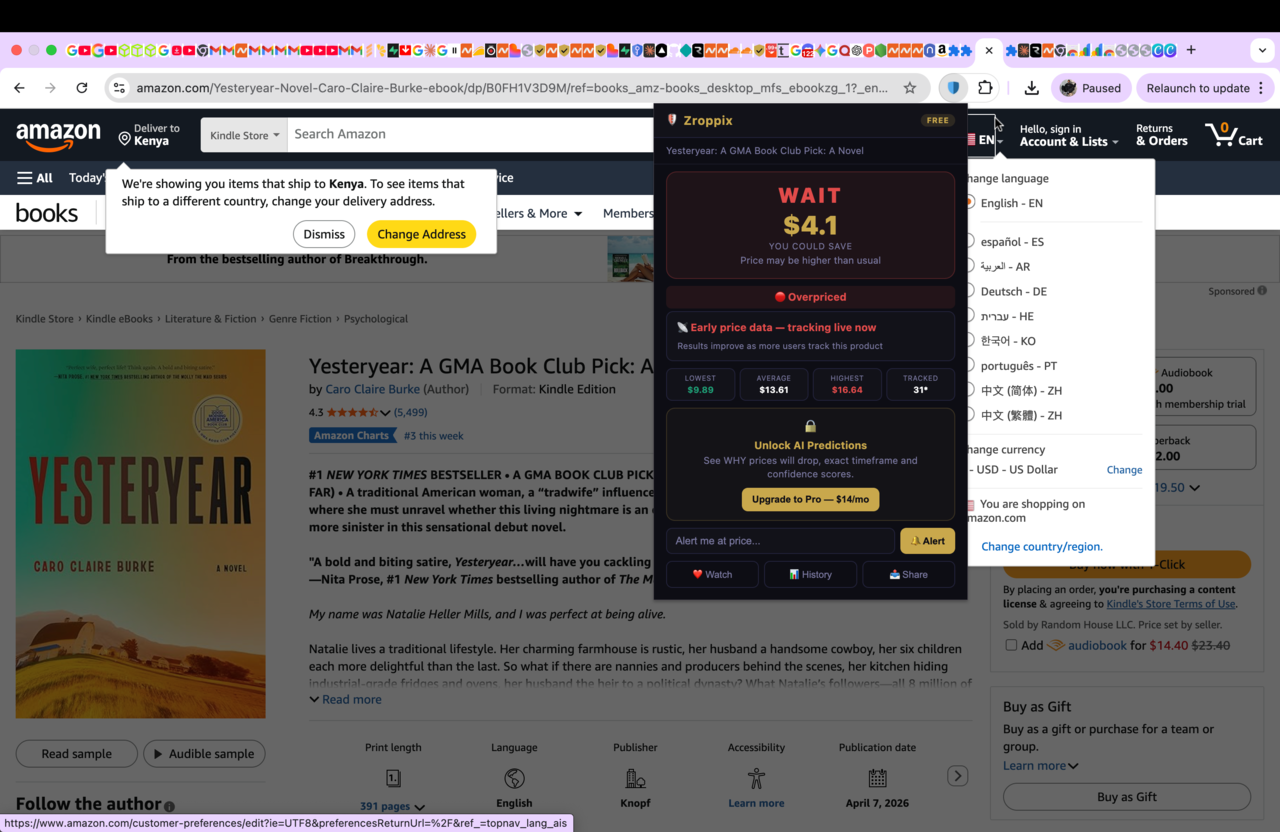
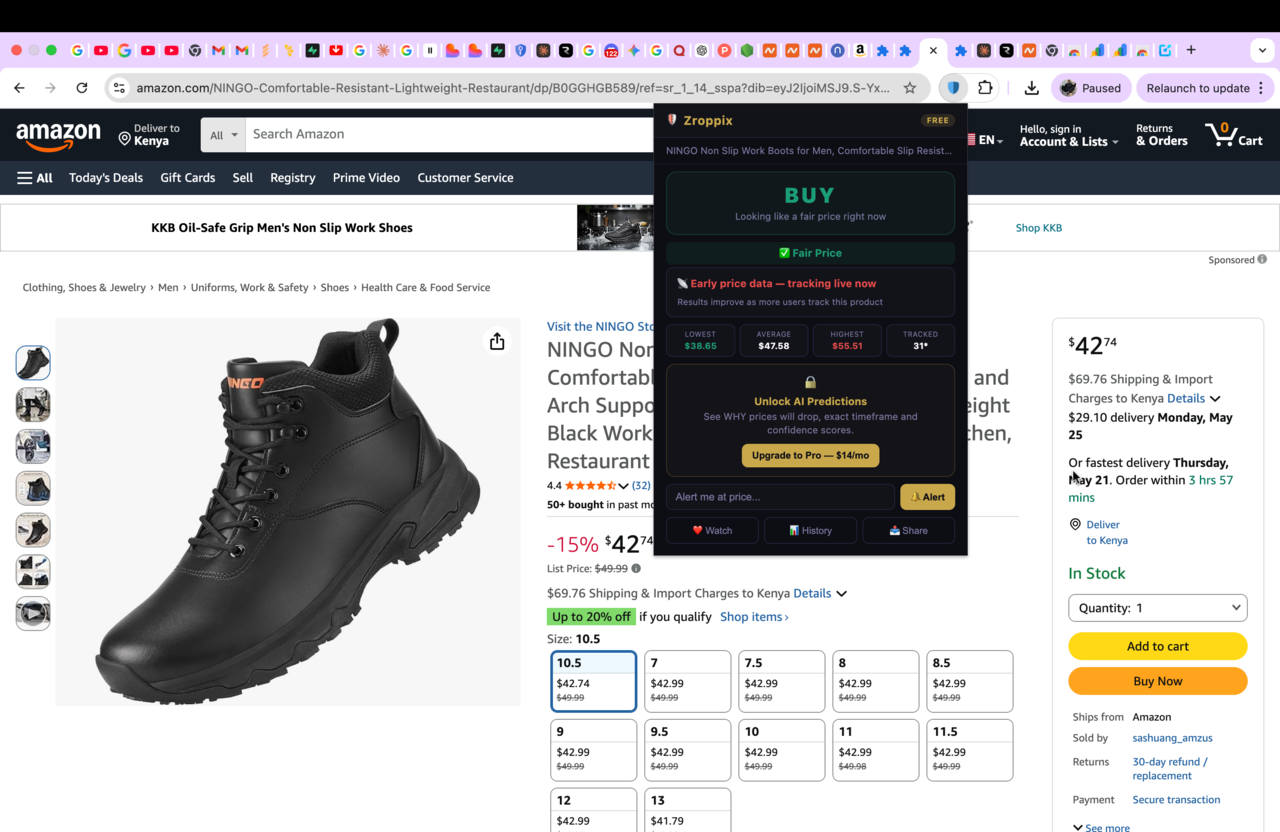
Click the gold shield in your toolbar. Read the BUY or WAIT verdict first — this is critical. If the verdict is BUY, the current price is already at or below the 90-day average. You do not need to set a watch — buy now. If the verdict is WAIT, the current price is above average and a watch makes sense. Proceed to step 4.
💡 Many shoppers discover they should buy immediately — the verdict saves the unnecessary waitSet your target price using the 90-day average as your guide
In the alert section at the bottom of the popup, enter your target price. Look at the stats row — it shows the 90-day lowest, average, and highest price. Set your target at or slightly below the 90-day average. This is the most reliable target: it is a price the product has demonstrably sold at recently and will almost certainly reach again within 30-60 days. See the target price guide below for product-specific recommendations.
💡 Do not target the all-time low — it may be a one-time clearance price from years agoEnter your email and click Alert
Type your email address. Click Alert. Your price watch is now active. Zroppix checks the price every hour from this moment. You will receive an email within one hour of the price dropping to your target. Your email is only used to send the notification — never shared with Amazon or third parties.
💡 No account needed — your email address is the only identifier requiredClose the Amazon tab permanently — do not return manually
This step matters more than most people realize. Close the Amazon product tab. Do not return to check manually. Every visit to the product page sends Amazon's algorithm a purchase intent signal, which can cause prices to stay elevated for your profile. The watch runs silently. When the email arrives — act within 2-3 hours. Amazon price drops can be temporary.
💡 The best price watch strategy: set it, close it, forget it until the email arrivesZroppix vs CamelCamelCamel vs Amazon Wishlist — Full Comparison
| Feature | 🛡️ Zroppix | 🐪 CamelCamelCamel | Amazon Wishlist |
|---|---|---|---|
| BUY or WAIT verdict before setting watch | ✓ | ✗ | ✗ |
| Custom target price control | ✓ Full control | ✓ Full control | ✗ No control |
| Price check frequency | Every 1 hour | Every few hours | Inconsistent |
| Alert speed after price drop | Within 1 hour | Several hours | Unpredictable |
| Account required | No — email only | Yes — free account | Yes — Amazon account |
| Free watches available | 3 free | Unlimited free | Unlimited (unreliable) |
| Works directly on Amazon page | ✓ | Extension or website | ✓ Built into Amazon |
| Overpay risk score | ✓ | ✗ | ✗ |
| What others paid data | ✓ | ✗ | ✗ |
| Reliability | High — hourly checks | Good — consistent | Low — misses most drops |
The Science of Setting the Right Target Price
The target price you set determines everything about whether your price watch is useful. Too high and the alert fires immediately at a price that was already available when you set it — no benefit from waiting. Too low and the alert never fires — you wait indefinitely for a price that never comes. The right target sits in a specific, calculable range based on price history data.
The 90-Day Average Rule — Your Default Target
For any product where you have no specific sale event planned, set your target at the 90-day average price shown in Zroppix. This is the price the product has sold at most of the time in the recent past. It is achievable. It represents a genuine fair price rather than a historical one-off. Products priced above their 90-day average return to that average within 30-60 days in the vast majority of cases — meaning your alert will fire within 2 months with high probability.
The Sale Event Adjustment
When a major sale event is approaching — Prime Day (June 2026 is approximately 4-6 weeks away), Back to School (July-August), or Black Friday (November) — adjust your target downward. Set it 15-25% below the current price rather than at the 90-day average. The 90-day average does not capture the deeper sale event discounts that these events deliver reliably. Setting the target at the average means the alert might fire just before the event at a moderate saving — when waiting 2-4 more weeks for the event would deliver a much larger one.
The 4 Mistakes That Stop Price Watch Alerts From Ever Firing
Setting the all-time historical low as your target
The product's all-time low price often happened during a one-off clearance event years ago that may never recur. Setting your target there means waiting indefinitely. The 90-day low is more realistic — a price the product reached recently and will likely reach again within weeks. The 90-day average is even more reliable as a target.
✓ Fix: Target the 90-day average, not the all-time historical lowReturning to the product page to check manually after setting the watch
Amazon's algorithm tracks each visit to a product page as purchase intent. Repeated visits signal that you are close to buying, which can cause the algorithm to maintain elevated prices for your specific browsing profile — the opposite of what you want. Set the watch and close the tab permanently. Zroppix monitors on your behalf without any browser visits.
✓ Fix: Set watch → close tab → wait for email → act on emailNot checking the BUY/WAIT verdict before setting the watch
Setting a price watch when the verdict is BUY means you are waiting unnecessarily for a price that is already fair. The verdict tells you whether you should buy now or wait. Skipping it results in waiting weeks for a product you could and should have bought the day you set the watch.
✓ Fix: Always check the verdict first — BUY means buy now, not set a watchDelaying action when the alert fires
Amazon price drops from flash sales, Lightning Deals, and temporary inventory clearances can last hours before recovering. Shoppers who see the alert and think "I'll buy it tonight" often find the price has already recovered. When Zroppix emails you — open it, verify the price, and buy within 2-3 hours. Especially during Prime Day when popular items sell out in minutes.
✓ Fix: Enable email push notifications — act within 2 hours of receiving alertWhat Zroppix Shows You Before You Set Your Price Watch
Set a price watch on any Amazon product — free
Zroppix monitors prices every hour and emails you the instant any watched product drops to your target. Free. No account. 30-second setup. Up to 3 products on the free plan.
Price Watch Strategy for Amazon Prime Day 2026
Prime Day 2026 is approximately 4-6 weeks away from the date of this guide. This is the most important price watch window of the year for electronics, Amazon devices, and major appliances. Here is the exact strategy:
Set watches now — before prices inflate
Amazon prices on popular products frequently increase in the weeks before Prime Day as demand ramps up. Setting your watches now — at current prices or slightly below — means you start monitoring before any pre-event inflation occurs. If prices rise before Prime Day and then drop during the event, your alert fires at the Prime Day discount level.
Target 20-30% below current for Amazon devices
Echo, Kindle, Fire TV, and Ring products drop 30-50% at Prime Day every single year. Setting your target at the 90-day average will not capture this — the Prime Day price goes significantly lower than the average. Target 30% below list price for Amazon devices and you will almost certainly receive an alert during Prime Day.
Layer alerts at multiple price points
For a $249 product — set one alert at $229 (small Prime Day discount), one at $199 (solid discount), one at $179 (deep discount). Whichever price it hits, you get notified. You then decide in real time whether that discount is enough. This eliminates the risk of having set a target that was just slightly too low to trigger.
Keep email notifications active on Prime Day
Check your email actively on Prime Day. The best deals on popular items sell out in hours on Day 1. When a price watch alert arrives during Prime Day — act immediately. Do not save it for after work. Do not wait until tomorrow.
Setting watches now on everything you plan to buy before the end of summer takes 10 minutes and could save $200-500 at Prime Day if you are buying electronics, Amazon devices, or major appliances. The setup effort is minimal. The potential saving is significant. Start setting watches today.
How Many Amazon Products Can You Price Watch at Once?
Zroppix free plan: 3 active price watches simultaneously. The right amount for most shoppers targeting 1-3 specific purchases at any given time — a laptop, headphones, and an appliance, for example. Free forever, no account required.
Zroppix Pro ($14/month): unlimited price watches. Worth upgrading if you are a frequent Amazon shopper wanting to watch 5+ products simultaneously, shopping for a home renovation, or consistently buying multiple electronics and appliances. The first significant price drop the Pro plan catches typically covers the monthly cost.
CamelCamelCamel free: unlimited price watches with a free account. Better for large watchlists if you do not want to pay — though checks are less frequent and alert delivery is slower than Zroppix's hourly monitoring.
The single most effective price watch habit: keep 3 active Zroppix watches running at all times. When one fires and you buy, immediately replace it with the next product you want. This systematic approach ensures you are never overpaying on any product category you regularly buy. Over a year, it saves the documented average of $312.
Set a price watch on any Amazon product right now
Zroppix monitors Amazon prices every hour and emails you the instant any watched product drops to your target. The only price watch tool that also tells you whether you should even wait before setting an alert. Free. No account. 30-second setup.
✦ Hourly monitoring · ✦ Instant email alert · ✦ BUY or WAIT verdict first · ✦ Up to 3 free watches · ✦ Free forever
🛡️ Add to Chrome — It's Free